Golf 2nd Plan
– Available at App Store / Goole Play –
Golf 2nd Plan


Golf 2nd Plan T.B.
Golf 2nd Plan mini (Free!)
Golf 2nd Plan T.B. mini (Free!)
patented
————————————————————————-
———————————————————————–
Concepts:
500ヤード、パー5、200ヤード先のバンカーを避けてフェアウェイ右側を狙う...そんなふうに打てたら苦労はない。
今日こそスコア100(あるいは120)を切りたい、そう思ってゴルフに臨んだのに、はじめの2ホールでいきなりトリプルボギーとクワドラプルボギー。
今日もダメか...楽しくプレーしたかったのに、早くも怒りと絶望のゴルフに呑み込まれる。
そんな時、客観的に目標まであと何回ダブルボギーとボギー(あるいはトリプルボギーとダブルボギー)が打てるのかを知らせるアプリ...
馬鹿ばかしい...しかしアプリが馬鹿ばかしいと、人は案外冷静になれるかもしれない。
500 yards, par 5. Avoid bunkers 200 yards ahead and aim for the right side of the fairway… If I can hit it like that, it won’t be difficult.
I want to cut a score of 100 (or 120) today. I went to golf with that in mind. But suddenly in the first two holes, triple bogey and quadruple bogey…
Can’t I do it, again today? … I wanted to enjoy playing, but I was already swallowed by the golf of anger and despair.
In such a case, an app that objectively informs you how many more double bogeys and bogeys (or triple bogeys and double bogeys) can be hit before the goal…
It’s ridiculous… However, if the app is ridiculous, people might be cool unexpectedly.
———————————————————————-
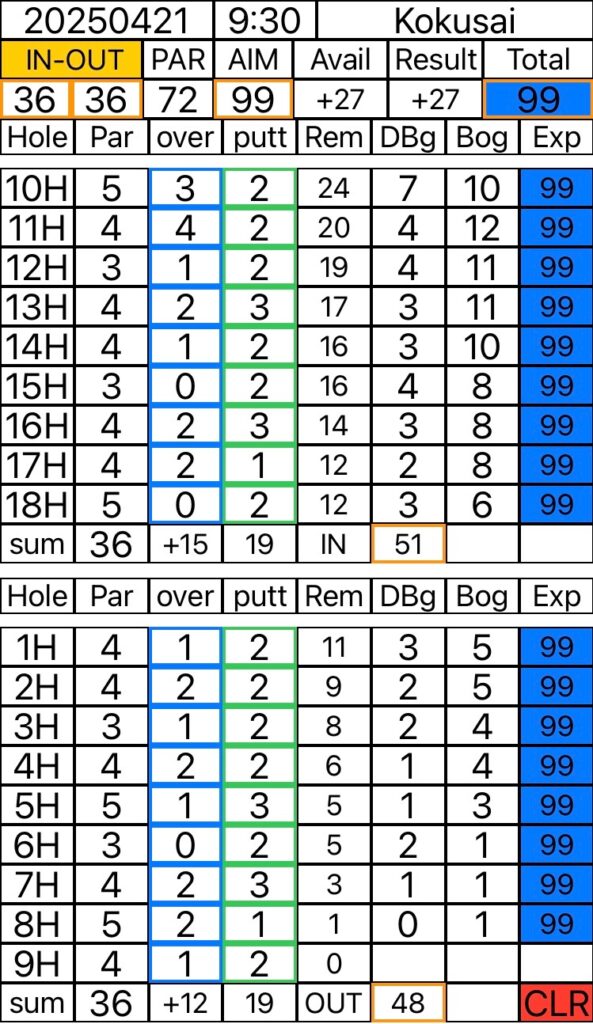
*操作方法
1. Date(日付)、Time(時刻)、At(場所)を記入(任意です)。
2. [OUT-IN]または[IN-OUT]のボタンを押してパターンを選択します。
3. OUTおよびINコースのパーを入力します(初期値36)。
4. [PAR]にコース全体のパーが表示されます(初期値72)。
5. [AIM]に目標スコアを入力します。プレー中、随時変更可能です。
6. [Avail]に,[AIM]と[PAR]の差、つまりオーバー可能な打数が表示されます。
7. [Par]に各ホールのパーの数を記入できます(任意です)。
8. [over]に各ホールのオーバー打数を入力します(例:ボギーは1、ダブルボギーは2、パーは0、バーディーは-1)。
9. [putt]にパターの打数を入力できます(任意です)。
10. [Rem]に各ホール終了時点で、目標達成のためにオーバー可能な残打数が表示されます。(使い切るとゼロ、さらにマイナスになります)
11. [DBg]に各ホール終了時点で、目標達成のために可能な最大のダブルボギーの回数が表示されます。
12. [Bog]には対応するボギーの回数が表示されます。
13. [Exp]に上記の組み合わせによる予想スコアが表示されます。目標スコア圏内ならば背景が青色で表示されます。
14. 全てのホールのオーバー打数を入力すると[Result]に実際のオーバー打数の合計が表示されます。
15. [Total]に実際の合計スコアが表示されます。
16. プレー中、目標スコア[AIM]と予想スコア[Exp]が大きく乖離した場合、[AIM]を再設定してモチベーションを維持・回復できます。
17. 結果はスクリーンショットで保存してください。
18. [CLR]ボタンでデータを消去できます。
*How to use
1. You can enter the Date, Time, and location (optional).
2. Press the [OUT-IN] or [IN-OUT] button to select the pattern.
3. Enter the par for the OUT and IN courses (default value 36).
4. The par for the entire course is displayed in [PAR] (default value 72).
5. Enter your target score in [AIM]. You can change it at any time during play.
6. In [Avail], the difference between [AIM] and [PAR], that is, the number of strokes you can go over, is displayed.
7. You can enter the number of pars for each hole in [Par] (optional).
8. Enter the number of strokes over each hole in [over] (e.g. bogey is 1, double bogey is 2, par is 0, birdie is -1).
9. You can enter the number of strokes putt in [putt] (optional).
10. [Rem] shows the number of strokes over remaining at the end of each hole to achieve your goal. (When all strokes are used up, it becomes zero and then negative.)
11. [DBg] shows the maximum number of double bogeys possible at the end of each hole to achieve your goal.
12. [Bog] shows the corresponding number of bogeys.
13. [Exp] shows the expected final score based on the above combinations. If it is within the target score range, the background will be displayed in blue.
14. When you enter the number of strokes over each hole, the total of the actual number of strokes over will be displayed in [Result].
15. The actual total score will be displayed in [Total].
16. If your target score [AIM] and expected score [Exp] deviate significantly during play, you can reset [AIM] to maintain and recover your motivation.
17. Save the results as a screenshot.
18. You can erase the data with the [CLR] button.